You’ll receive notifications in your Filevine Activity Feed—both globally and at the project level. You can also opt in to receive email and/or SMS alerts when a project gets a new Client Portal message, either immediately or in a daily digest.
Elevate Your Practice with Law Firm Client Portal Software
Enhance Legal Client Communication with Real-Time Case Status Updates
Transform legal client communication and enhance case management with Filevine's secure and intuitive client portal software.
Schedule A Demo
The Power of a Centralized Client Portal for Lawyers
Beyond Email: A Modern Approach to Client Communication
Modern law firms are moving beyond outdated communication methods. A client portal for lawyers provides a secure hub for all case-related interactions. This legal client portal software simplifies communication, document sharing, and collaboration, enhancing client relationships and improving efficiency. With a law firm client portal, you can provide 24/7 access to case information, improve responsiveness, and build stronger client relationships.
Demo Client Portal


Client Portal Forms
Collect the Info You Need—No Extra Steps
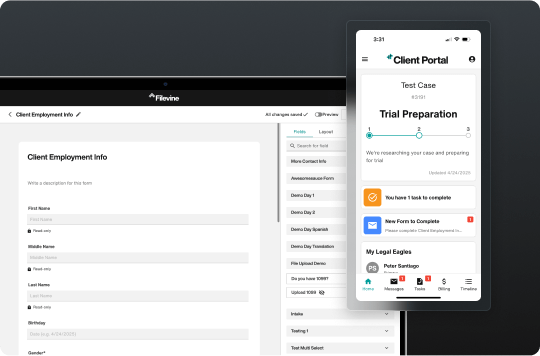
Create custom forms in Client Portal and gather client data tied directly to your Filevine fields. Clients can fill out forms securely, in their own language, and responses flow straight into your project in your language—no follow-up, no manual entry. Cut down on emails, speed up your workflow, and focus on what matters most: moving cases forward.
Try Smarter Forms
Key Features of Filevine's Client Portal Software

Secure Communication
Safeguard client confidentiality with Filevine's secure client communication tools. Share sensitive information, exchange messages, and collaborate on documents within a protected environment, ensuring peace of mind for both you and your clients.

Simplified Collaboration
Your work relies on input from a wide range of outside contributors, including expert witnesses, medical providers, outside counsel, vendors, and more. Filevine provides your team a secure, central hub to manage the separate lines of communication with these external parties. Outside contributors can now communicate with your team and share documents directly to your project management system — without having access to the rest of the platform.

Empowered Clients
Give your clients 24/7 access to their case information with a dedicated client portal for lawyers. Empower them to stay informed, track progress, and actively participate in their legal journey, fostering trust and satisfaction.
Enhancing the Client Journey with Filevine's Client Portal
Effortless Communication
Say goodbye to phone tag and missed calls. With Filevine's Client Portal, clients can securely message their attorneys at their convenience, ensuring timely communication and prompt responses.
Enhance Client Communication

Simplified Document Management
No more emailing large attachments or worrying about version control. Clients can securely upload and download documents directly through the portal, ensuring everyone has access to the latest information.
Simplify Document Sharing

Increased Transparency & Trust
Empower your clients with 24/7 access to their case information. Filevine's Client Portal provides transparency and clarity, fostering trust and reducing anxiety throughout the legal process.
Boost Client Transparency

Advanced Features for Enhanced Case Management
Keep your clients informed and reduce inquiries with real-time case updates and progress tracking. Clients can easily view their case timeline, upcoming deadlines, and completed tasks, fostering transparency and peace of mind.
Explore Case Management Features ›
Reinforce your brand identity and provide a professional client experience with customizable branding options. Tailor the portal's look and feel to match your firm's colors and logo, creating a seamless and consistent brand experience.
Personalize Your Client Portal ›
Simplify your billing process and improve cash flow with integrated billing and payment features.
Clients will be able to easily view invoices, make secure online payments, and access their payment history, all within the Client Portal.

Gain valuable insights into client engagement and portal usage with the internal use dashboard. Track key metrics, monitor communication effectiveness, and optimize your client portal strategy for maximum impact.
Gain Valuable Insights ›
The Leading Client Portal for Modern Law Firms
Filevine's Client Portal empowers your clients and simplifies your workflows, enhancing your firm's reputation and efficiency.
- Effortless Integration: Eliminate third-party solutions with a client portal built directly into Filevine's case management system.
- Client-Centric Approach: Provide 24/7 access to case information, secure messaging, and easy document sharing, fostering transparency and trust.
- Unmatched Efficiency: Reclaim valuable time with automated updates, effortless communication, and simplified document management.
- Commitment to Innovation: Stay ahead of the curve with future-proof technology designed for the evolving legal landscape.

Frequently Asked Questions
How am I notified when a client sends a message through the Client Portal?
Are messages sent through the Client Portal the same as standard SMS text messages in Filevine?
No, messages sent and received within the Client Portal are distinct from Filevine's standard SMS texting feature.
Client Portal messages are contained securely within the portal environment. While you can use SMS to invite a client to the portal or notify them of a new portal message or update, the actual conversation happens inside the portal, not via standard SMS threads.
The standard Filevine SMS feature remains available as a separate communication option.
Can I invite non-clients (like medical providers, experts, or co-counsel) to the Client Portal? What can they see?
Yes. You can invite non-clients—including medical providers, experts, or co-counsel—to the Client Portal. Regardless of contact type, individuals only see the messages, documents, and forms that the firm has shared with them or that they’ve personally submitted. There is no content sharing between different portal users.
How does the case timeline shown in the Client Portal relate to the project phases we use internally in Filevine?
You have complete control over the case timeline shown to clients. In the Client Portal Manager, you choose which internal Filevine project phases map to specific, client-facing steps.
You can customize the names of these steps and decide which internal phases are relevant to display, ensuring clients see a clear and curated view of their case progress. Not all internal phases need to be mapped to a client-visible step.
How much does the Filevine Client Portal cost?
The Client Portal is included as a core feature of the Filevine platform at no additional cost. It's part of our commitment to providing comprehensive solutions that enhance client communication and firm efficiency.


